
Appearance
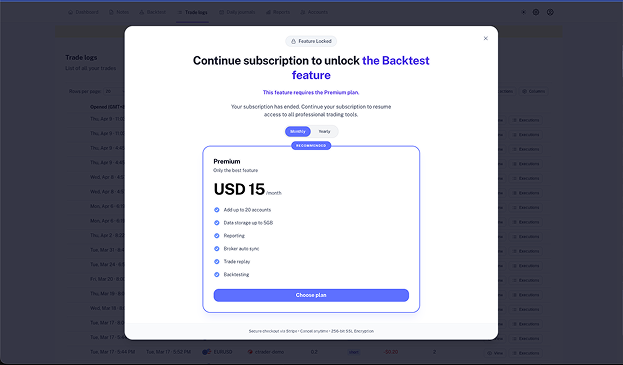
Why am I seeing a paywall?
Hit a roadblock? If you're seeing a 'Please Upgrade' message, it usually means you've reached a limit or are trying to use a premium tool.
We keep the core journaling features simple and accessible, but some advanced tools and higher limits are reserved for our Premium plan. If you've just seen a paywall, here is likely why.
Common reasons for a paywall
1. You've reached an account limit
Our plans are designed to scale with your trading:
- Basic Plan: You can add up to 1 trading account.
- Premium Plan: You can add up to 20 trading accounts.
If you're on the Basic plan and try to add a second account, you'll see a paywall inviting you to upgrade.
2. You’re using a Premium feature
Some of our more powerful analysis tools require a Premium subscription. These include:
- Trade Replay: Relive your trades candle-by-candle to find what you missed.
- Backtesting: Test your strategies against historical data.
If you are on the Basic plan, these features will be locked.
3. Storage limits
The Basic plan includes 1GB of storage for screenshots you upload to your journal entries. (Important: Your trade data and execution history do not count toward this limit). If you find yourself uploading multiple high-resolution screenshots for every trade, you might hit this limit and need the 5GB provided on Premium.
4. Your subscription is inactive
If features you used to have are now locked, your account might have become Inactive. This happens if a trial ends or a payment fails. Check your subscription status to be sure.
What should you check?
- Billing Status: Go to Settings → Billing to see your current plan and if it's active.
- Usage: See if you've already added your maximum allowed accounts.
- Feature Tier: Check if the tool you're clicking (like Backtesting) is included in your current plan.
How to move forward
- Upgrade instantly: You can move from Basic to Premium at any time from the Billing page. The new features will unlock immediately.
- Manage what you have: If you're at your 1-account limit on Basic, you can archive or delete an old account to make room for a new one without upgrading. Archiving keeps your past data safe but stops new syncs.
- Update payment: If your card expired, updating your billing info will restore your Premium access right away.
Trade Tip: If you're just looking to review your past performance and don't need to add new trades or use pro tools right now, an Inactive subscription still lets you view all your data.