
Appearance
Manage your subscription
Need to change your plan or update your card? You can handle everything related to your subscription right here.
Managing your subscription shouldn't be a headache. Whether you're ready to upgrade for more accounts or need to update an expired card, the Billing page is your one-stop shop.
Quick access to billing
- Head to Settings in the main menu.
- Select Billing.
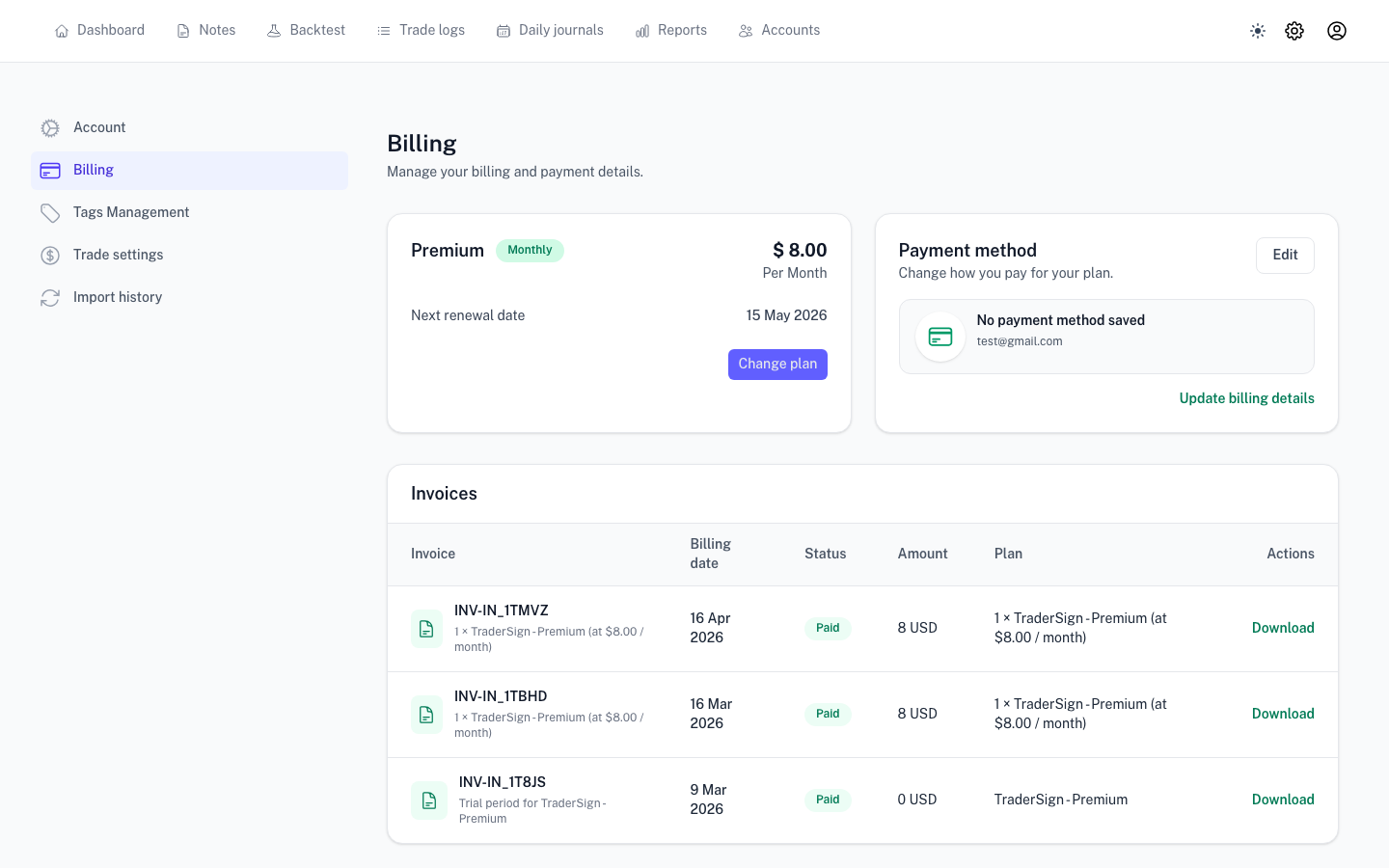
What can you do here?
Update your payment method
Card expired? You can swap out your payment details anytime to ensure your syncs keep running without interruption.
Change your plan
If you've outgrown your current plan (or want to scale back), you can switch tiers with just a couple of clicks. Upgrades usually take effect immediately so you can get back to trading.
Cancel your subscription
We'd hate to see you go, but if you need to cancel, you can do it directly from the billing area.
Wait! What happens to my data if I cancel? Don't worry—we don't just delete your history. Typically, your account will move to a Read-Only state once your paid time runs out. You'll still be able to see your old trades and journals, you just won't be able to import new ones.
Things to keep in mind
- Renewal Dates: We'll show you exactly when your next payment is due.
- Invoices: Need a receipt for tax or accounting? You can download all your past invoices directly from this page.
- Access Limits: Some features are tied to specific plans. If a feature suddenly looks locked, check your current plan tier here.
Next step: Inactive subscription